
1. Select the Profile tab in the top bar
2. Find the Travel Arrangers section in the bottom left hand corner of the Profile. A list of colleagues who you have authorized to book travel and create expense reports on your behalf are listed here.
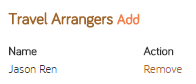
3. Select the Remove button next to the name of the colleague whose authorization book travel and create expense reports you would like to revoke.